Understanding DNS: How the Internet Finds Its Way

Imagine typing courses.chaicode.com and seeing the front-page of the website, fascinating right? Have you wondered what actually happens behind the scenes when you type that in your browser, how does the internet know where to actually find and what to show for courses.chaicode.com?
The magic behind this lies in a system that quietly works in the background every time you use the internet—DNS, or the Domain Name System.
DNS in Human Terms
Humans are smart enough to recognize each other through names, but our day-to-day systems work a bit differently. Unlike us, systems don’t rely on names; they find it easier to identify things through numbers. For instance, when you type something like courses.chaicode.com into your browser, your browser doesn’t inherently understand that name. Instead, it relies on a unique identifier called an IP address (technical jargon alert!) to know where to go.
This is where DNS comes into play—it acts as a translator, bridging the gap between the names we understand and the numbers that systems need. Before we dive deeper, lets acknowledge the technical jargon earlier used i.e. IP address.
IP Addresses: The Internet’s True Identity System
An IP address, or Internet Protocol address, is like the address of your house—but for your device on the internet. Just as a mailman needs your home address to deliver a package, computers and other devices need an IP address to send and receive information. Without IP addresses, devices wouldn’t know how to find each other online. This is not the end to it; IP addresses are of two types ipv4 and ipv6.

IPv4: The First Internet Addressing System
IPv4 (Internet Protocol version 4) is the original system for assigning IP addresses. It uses a 32-bit format. But issue with IPv4 is that it is limited and can only generate about 4.3 billion unique addresses which was more than enough before the internet exploded! The last batch of IPv4 addresses was officially allocated in 2011. Think of it as a sold-out concert!
IPv6: The Upgrade We Needed
To solve the shortage, IPv6 (Internet Protocol version 6) was introduced. IPv6 uses a 128-bit format which means it could generate around 340 undecillion unique addresses (1 undecillion is 1 followed by 36 zeroes).
DNS Flow
Suppose you visited courses.chaicode.com on your browser, but as discussed earlier, our browser is unaware of where to take you to unless it has its IP address. That is where DNS starts its magic to look for the IP address of courses.chaicode.com. This is why DNS is often referred to as the “phonebook of the internet” because it translates human-readable domain names, like courses.chaicode.com, into machine-readable IP addresses, such as 18.67.233.44, enabling browsers to load Internet resources.
Easy to understand DNS Steps
- When you first enter courses.chaicode.com on your browser, the browser (technically speaking the stub resolver) checks into the cache of the browser if there is the related information about your search, if yes then you see the website, in case there is no information related to courses.chaicode.com in the cache, it forwards the requests to the ISP (technical jargon alert!) resolver server
An ISP (Internet Service Provider) is a company that connects you to the internet, enabling your access to websites, services, and other online resources.
- The ISP checks in it’s own cache if it has any information saved, and if it does it returns to browser otherwise sends its request to a root server (technical jargon alert!)
The Root Server are like the mafia in the DNS world, they stand at the top of hierarchy of the servers working to search DNS. There are 13 sets of Root Servers spread across multiple locations worldwide for redundancy and load balancing and are managed by 12 organizations. Each Root Server has their own IP Address. You can run the command
nslookup set type=ns .on windows command prompt to see them.

The Root Servers might sit at the top of the DNS hierarchy, but they don't hold the IP addresses for specific domains like
courses.chaicode.com. However, they do know exactly where to find the Top-Level Domain (TLD) servers—for example, the.comTLD server. (I know a guy, who knows a guy.)When a query reaches a root server, it doesn't resolve the domain name itself. Instead, the root server points the request to the relevant TLD server, like the
.comserver.
A Top-Level Domain (TLD) is the last segment of a domain name, located after the final dot(hidden), such as
.com,.org, or.netetc.A Top-Level Domain (TLD) Server is a DNS server that manages the information for all domain names sharing a common TLD, directing queries to the appropriate authoritative name servers.

- TLD still does not know the address we are actually looking for, hence leads us to Authoritative Name Server that finally knows the IP address for
courses.chaicode.comwhich shall send the correct IP to the user’s device. This is where the actual information about the domain resides.

DNS Record Types
In DNS, a zone file is a database containing mappings of domain names to various types of information. These mappings are stored in DNS records, each serving a specific purpose. Here are some common DNS record types:
- A Record (Address Record):
Maps a domain name to an IPv4 address.
Example:
example.com→ 192.168.1.1
- AAAA Record (IPv6 Address Record):
Maps a domain name to an IPv6 address, designed for the newer IP address standard.
Example:
example.com→ 2607:f0d0:1002:51::4
- CNAME Record (Canonical Name Record):
Points one domain name to another domain name (alias). Useful for subdomains.
Example:
blog.example.com→example.com
- PTR Record (Pointer Record):
Used for reverse DNS lookup: maps an IP address back to a domain name. It is the reverse of A/AAAA records.
Example:
192.168.1.1 →example.com
Reverse DNS
The Reverse DNS is the method to find the domain name of the computer from the IP address which is the opposite of the common forward DNS lookup, which resolves domain names into IP addresses.Reverse DNS lookup works by checking special records called PTR Record. If a PTR record exists it can find the domain name linked to that IP address. If no PTR record exists the reverse lookup fails. It is a good idea to have the PTR record set up especially if you are running the email server. This will helps other email servers trust that your emails are not the spam. Reverse DNS is helpful for:
Blocking spam emails: Many email servers use reverse DNS to stop spam emails from IP addresses that do not have the proper website address linked to them
Analytics: Reverse DNS helps show website addresses instead of just IP address numbers in analytics reports, which is easier to understand.
Track website visitors: IP addresses of people visiting the website are recorded which is useful for businesses trying to get new customers.
DNS Spoofing
DNS spoofing, also known as DNS cache poisoning, is a malicious attack where the attacker alters DNS records to redirect users to fraudulent or harmful websites. By injecting false information into a DNS resolver’s cache, the attacker tricks users into believing they are visiting a legitimate site when, in reality, they are accessing a fake one. Like if your are trying to visit facebook.com on an unsecured internet connection. If someone happens to be sniffing on your open port or has already done a man-in-the-middle attack, then they are able to corrupt the DNS records. This can lead to phishing attacks, data theft, or malware installation. Therefore, redirecting you to a fake Facebook page that is a replica of the official login page. When you type in your username and password, they will be able to steal your login credentials and inject a virus or worm into your IP address
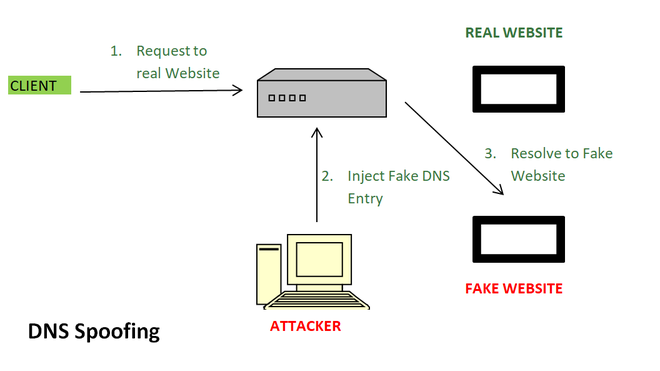
To prevent DNS spoofing, measures like DNSSEC (DNS Security Extensions) and regular cache validation are implemented to ensure the integrity and authenticity of DNS records.
DNSSEC is a security protocol designed to protect the Domain Name System (DNS) from attacks like DNS spoofing or cache poisoning.
When a DNS record is created, DNSSEC generates a digital signature for it using a private key. When a client requests this DNS record, the server sends the record along with its signature. The client can then verify the authenticity of the data using a corresponding public key stored in DNS.
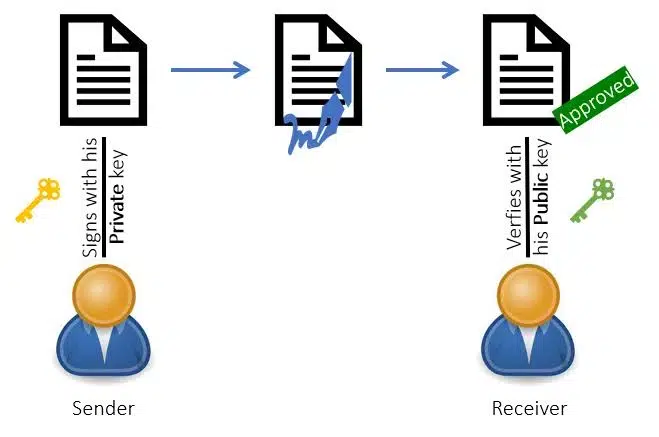
DNSSEC work is not to encrypt DNS queries or responses, it just provides ensures the user that they are connected to the correct, intended website, rather than being redirected to a malicious one.
Conclusion
The Domain Name System (DNS) might often go unnoticed in our daily lives, but it is the backbone of the internet, ensuring seamless communication between human-readable domain names and machine-friendly IP addresses.